


Using Trello for Project Management
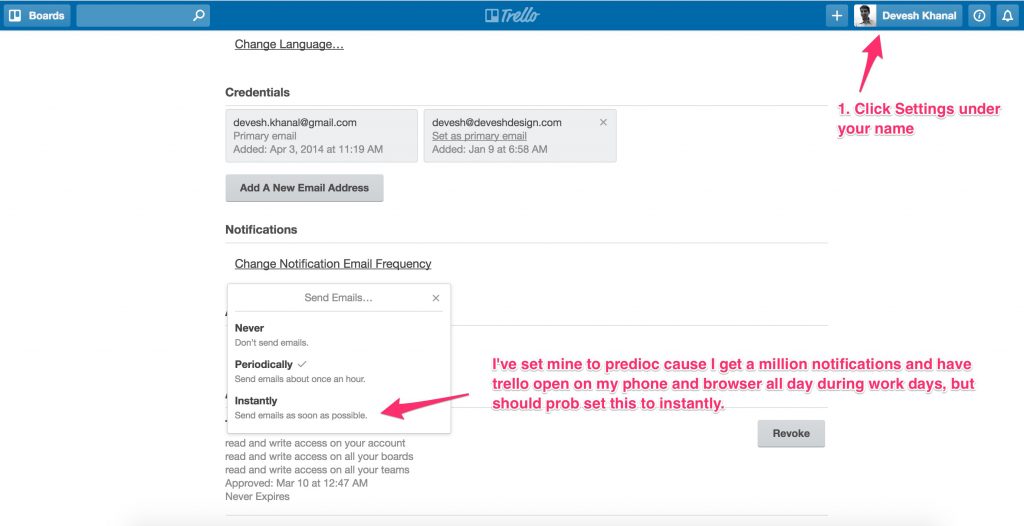
1. Notifications – Works best when you get email notifications when you’re tagged, which can be setup here:
2. To make sure I/we get messages, be sure to tag me in your messages: “@deveshkhanal Test looks good, let’s launch!”
3. We put all experiment details in the “description” of each Trello card. 1 card = 1 experiment. There you can find the goals, hypothesis, preview links, results updates, etc.

Process wise, I’ll generally tag you for approval at these stages:
1. Conceptual: “@yourtrellonamehere, attached is an idea for the webpage…etc….Let me know what you think.” (Sometimes this happens on calls instead of via Trello.)
2. Design: “@yourtrellonamehere, attached is the finalized design for this experiment. Let me know if you approve” I’ll generally tag you on concept, design approval and cc you.
3. Final coded test before launch: “@yourtrellonamehere, here’s the preview link. Once you approve we’ll launch”.
If you’d like more/less notifications than these, just let me know, but this generally gives a good rhythm.